
What Is AI Product Photography?
AI product photography uses artificial intelligence to create, enhance, or transform product images for online stores, advertising campaigns, and digital catalogs. Instead of producing every visual through a traditional studio photoshoot, businesses can use AI tools to generate alternative backgrounds, lifestyle scenes, and different visual styles from product images.
AI product photography can help ecommerce brands produce more visual content, test creative ideas, and maintain a consistent look across their catalogs.
Folio AI is one platform designed for this purpose. It offers tools for ecommerce photo sets, studio hero shots, lifestyle photography, specialized product categories, and catalog creation. It also includes tools for generating product-related videos and marketing content.
For photographers, online retailers, and small businesses, this creates new opportunities to combine traditional photography with AI-assisted production.
In this guide, you will learn how to use Folio AI for product photography, how to prepare your images, which results to evaluate, and when professional photography remains essential.
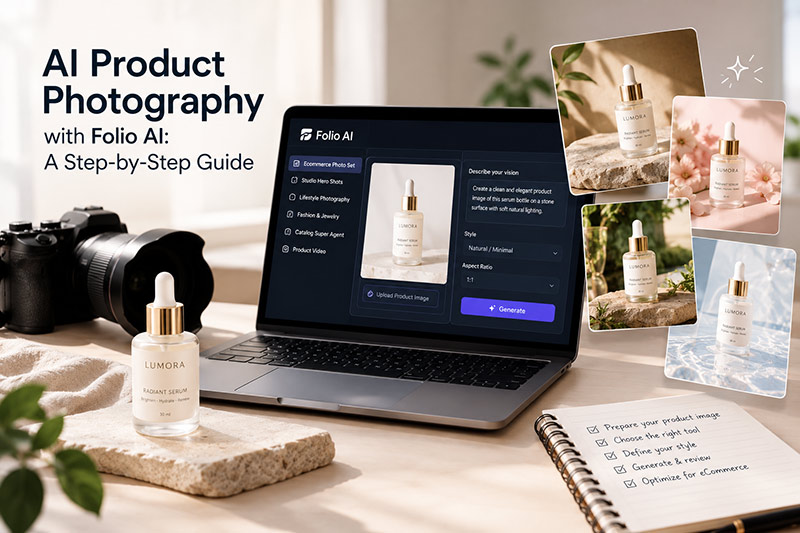
AI Product Photography with Folio AI: A Step-by-Step Guide
If you need a Professional Istanbul Product Photography Services, you can check the link.
What Is Folio AI and How Does It Work?
Folio AI is an AI-powered platform that helps businesses create product visuals and organize product information for ecommerce and digital catalogs.
Its official website lists several relevant tools, including:
- Ecommerce Photo Set: Create a collection of product images for online selling.
- Studio Hero Shots: Develop prominent product visuals for product pages and promotional materials.
- Lifestyle Photography: Present products in contextual scenes rather than isolated studio settings.
- Fashion and Jewelry Assistants: Create product-related visuals for specific categories.
- Catalog Super Agent: Help organize product content and build catalogs.
- Product Video Tools: Generate video content from product images or other supported inputs.
The available tools and their exact workflows may change as the platform develops.
The main advantage of this approach is that businesses can explore multiple visual directions without arranging a separate physical photoshoot for every variation.
However, AI-generated images still require human review. A visually attractive result is not necessarily an accurate representation of the product.
How to Create AI Product Photos with Folio AI
The following workflow provides a practical starting point. The precise controls and available options may vary depending on the tool you select within Folio AI.
Step 1: Prepare Your Original Product Image
Start with a clear photograph of the actual product.
Although AI can generate product visuals, the quality of your original reference image can influence the final result. A good source photograph helps establish the product’s shape, color, material, and distinctive details.
Before uploading your image, check the following:
- The product is in focus.
- Important details are clearly visible.
- The lighting reveals the product’s real color and texture.
- The product is not unnecessarily cropped.
- Logos, labels, and distinctive design elements are visible.
- The background does not obscure the product.
For reflective products, such as jewelry, glassware, and polished metal objects, pay particular attention to highlights and reflections.
For fashion products, capture important details such as stitching, fabric texture, seams, buttons, and garment proportions.
Professional tip: Keep your original photograph. It gives you a reference for checking whether the AI-generated image still represents the actual product accurately.
Step 2: Choose the Right Folio AI Tool
Open Folio AI and explore the available image-generation tools.
Choose a tool according to your intended result. For example, an ecommerce photo set may be appropriate when you need several product images, while lifestyle photography may be more suitable for showing how a product fits into a real-world setting.
Consider your objective before generating images:
- Product listing: A clear image that emphasizes the product.
- Website hero image: A prominent visual for a landing page or product page.
- Lifestyle image: A contextual scene that communicates how the product might be used.
- Fashion catalog: Images that present apparel and accessories consistently.
- Advertising creative: A visual designed for a particular campaign or audience.
Choosing the right output type first makes it easier to evaluate the results.
Step 3: Define the Visual Style
Think about the visual identity of your brand before generating images.
A premium skincare brand may benefit from soft light, neutral backgrounds, and subtle textures. A sports brand may need stronger contrast, dynamic compositions, and energetic environments.
A useful visual brief should describe:
- Background and environment
- Lighting direction and quality
- Camera angle and framing
- Color palette
- Mood and visual style
- Intended use of the image
If the selected Folio AI tool supports text instructions or prompts, use clear and specific language.
For example, you could try this brief for a skincare product:
“Create a premium ecommerce product image using the uploaded skincare bottle as the reference. Place it on a warm beige stone surface with soft natural side lighting, subtle shadows, and a minimal background. Keep the bottle’s original proportions, label, logo, and color accurate. Use a clean luxury beauty aesthetic with space around the product.”
This is an example of an instruction you can adapt to the capabilities of the selected tool, not a guarantee that every detail will be preserved.
Step 4: Generate Product and Lifestyle Images
Once your reference image and visual direction are ready, use the relevant Folio AI tool to generate your images.
Rather than creating many unrelated visuals, begin with a small, coherent set.
For example, an online skincare store might need:
- A clean product image for the main listing.
- A closer view showing the packaging and label.
- A lifestyle image with natural materials.
- A wider composition for a website banner.
- An alternative visual for a social media campaign.
The goal is to create variety without changing the product’s identity.
Review each result carefully. AI systems may alter small details, including label text, cap shape, material texture, or the relationship between different product components.
Discard or correct results that misrepresent the item.
Step 5: Review and Refine the Results
This is one of the most important steps in AI product photography.
A generated image can look convincing at first glance but contain errors when viewed at full resolution.
Compare each image with the original photograph.
Check product accuracy
Does the product have the correct shape, proportions, color, and number of components?
Check branding
Is the logo accurate? Is the label readable? Have any letters or numbers changed?
Check materials
Does metal look like metal? Does fabric retain its texture? Does glass have believable reflections?
Check lighting and shadows
Do the shadows match the light source? Does the product appear grounded in the scene?
Check consistency
If you generate several images for one product, do they look as though they belong to the same brand and campaign?
If the platform provides suitable editing or regeneration controls, use them to refine the result. Otherwise, try a more precise instruction or a different source image.
Do not assume that repeated generation will automatically solve every problem. Some product details may require manual retouching or a new photograph.
Step 6: Prepare Images for Ecommerce
Before publishing, make sure your images meet the requirements of your website or sales platform.
Check the recommended image dimensions, file size, format, background requirements, and product-image policies for the destination.
For a consistent product catalog:
- Use a consistent visual style across similar products.
- Keep product scale and framing reasonably consistent.
- Make sure the main image clearly shows the item being sold.
- Use lifestyle images to communicate context rather than replace essential product views.
- Export images at a suitable resolution for desktop and mobile displays.
- Use descriptive file names and accurate alt text.
For example, a descriptive file name might be beige-skincare-bottle-product-photo.jpg.
An appropriate alt text could be “Beige skincare bottle photographed against a neutral background.”
Alt text should describe the actual image. Do not insert keywords where they do not help the reader.
How to Use Folio AI for Ecommerce Product Photography
AI product photography can support several stages of ecommerce content production.
See my latest E-commerce Product Photography Production works.
1. Build a Consistent Product Catalog
Online stores often need several images for every product. When a business sells dozens or hundreds of items, maintaining a consistent visual style can become time-consuming.
AI tools can help create variations within a shared visual direction.
For example, a homeware brand might use similar backgrounds, lighting, and framing across its ceramic products. This can make the catalog feel more cohesive.
Nevertheless, consistency should not come at the expense of accuracy. The dimensions, finish, color, and distinctive characteristics of each product must remain truthful.
2. Create Lifestyle Images Without a Full Set Rebuild
Lifestyle images help customers understand the context in which a product might be used.
A ceramic cup could appear on a breakfast table. A handbag could be shown in a carefully styled fashion setting. A skincare bottle could be placed in a bathroom environment with natural light.
Folio AI’s lifestyle photography tools can help businesses explore this type of visual content.
Use these images to complement your main product photographs. If the scene includes accessories, people, or other objects, make sure it does not imply that those items are included with the purchase when they are not.
3. Produce Visuals for Different Marketing Channels
The same product may need different presentations for a product page, advertising campaign, website banner, or social media post.
AI-assisted production can help explore these variations more efficiently.
For example, a product page might require a simple, informative photograph, while an advertising campaign could benefit from a more atmospheric composition.
Before publishing, check the aspect ratio, cropping, text placement, and display requirements for each channel.
4. Support Small Businesses with Limited Production Budgets
Not every small business has access to a studio, product stylist, photographer, and retoucher for every new collection.
AI product photography may help these businesses develop additional visual assets from existing product images.
However, the real cost should include more than the generation process. Consider subscription fees, AI credits, image review, corrections, retouching, and the time required to produce usable results.
For some products, a well-planned traditional photoshoot may still be the more reliable option.
Can AI Product Photography Replace a Professional Photographer?
AI product photography can reduce the need for certain types of reshooting, but it does not eliminate the need for professional photography in every situation.
As a fashion and product photographer, I see the greatest potential in combining the two approaches.
Traditional photography captures the actual product, its physical details, and the way light interacts with its materials. AI can then help explore alternative settings, visual concepts, and marketing applications.
This hybrid workflow can be especially useful when a business already has accurate product photographs but needs more variety for its digital channels.
When AI Product Photography Works Well
AI-generated images may be useful for:
- Exploring alternative backgrounds and environments.
- Creating additional lifestyle concepts.
- Developing campaign variations.
- Expanding visual content for online catalogs.
- Testing different creative directions before a larger campaign.
When Traditional Photography Is Still Essential
A real photoshoot is particularly important when:
- Customers need accurate views of a product’s construction.
- Color and material fidelity are critical.
- Fine details must be documented precisely.
- A campaign requires a specific model, physical interaction, or controlled lighting.
- The product must be represented exactly as delivered to the customer.
For fashion products, AI-generated model images also need careful review. Garment fit, proportions, fabric behavior, and construction can change during generation.
The best workflow depends on the product, the brand’s requirements, and the level of accuracy customers expect.
Pros and Cons of Using Folio AI for Product Photography
Advantages
More creative flexibility: You can explore different visual directions without building every scene physically.
Additional content opportunities: AI tools can help create alternative product presentations for catalogs and marketing campaigns.
Integrated workflow: Folio AI brings together product imagery, catalog-related tools, and other content-generation capabilities.
Useful for small businesses: Businesses with limited production resources can explore additional visual assets from their existing product images.
Limitations
Product accuracy is not guaranteed: Generated images can contain incorrect details, logos, labels, or proportions.
Results require review: Human judgment remains important for selecting and correcting usable images.
Costs depend on usage: Subscription plans, AI credits, and additional editing time can affect the overall budget.
Not every product suits AI generation: Highly reflective materials, complex construction, and products requiring precise visual documentation may need traditional photography.
Commercial requirements still matter: Before publishing, review the platform’s current terms and the requirements of your sales channels.
Overall, Folio AI is worth exploring as part of an ecommerce content workflow, especially when a business needs multiple visual concepts. Its suitability depends on the quality of the results and how much correction each project requires.
Frequently Asked Questions
What is AI product photography?
AI product photography uses artificial intelligence to create or modify product images. It can help businesses explore different backgrounds, lifestyle scenes, and visual styles for ecommerce and marketing.
Can I use Folio AI for ecommerce product photography?
Folio AI offers ecommerce photo sets, studio hero shots, lifestyle photography, and specialized tools for product categories. These features can support ecommerce image production, although the available options and results should be checked in the current application.
Can AI generate realistic product photos?
AI can produce convincing product imagery, but realism varies by product, source image, and generation method. Always compare the result with the real product, particularly when labels, materials, dimensions, and colors matter.
Is AI product photography cheaper than a traditional photoshoot?
It can reduce some production costs, especially when many creative variations are needed. However, subscription fees, credits, review time, corrections, and retouching must also be considered. A direct cost comparison depends on the project.
Can AI product photography be used on online marketplaces?
Potentially, yes, but every marketplace has its own requirements for main images, backgrounds, product accuracy, and permitted image editing. Review the current rules of your sales platform before publishing AI-generated visuals.
Do I need professional product photographs before using Folio AI?
A good reference photograph can help establish the product’s real appearance. Depending on the tool and workflow, you may be able to begin with a product description or other supported inputs. For products where accuracy matters, starting with a clear photograph is a sensible approach.
Is Folio AI suitable for fashion product photography?
Folio AI lists fashion-related tools that can support product presentation. However, generated images should be checked for garment details, fit, fabric texture, color, and accurate representation of the item.
Final Thoughts
AI product photography is creating new opportunities for ecommerce brands, independent makers, and photographers. Tools such as Folio AI can help businesses explore additional product visuals and develop more varied digital catalogs.
The most effective approach is not simply to generate as many images as possible. It is to create useful, consistent, and accurate images that help customers understand the product.
Start with a good reference photograph, define your visual direction, generate a small set of images, and review every result before publishing.
For photographers, AI is best treated as an additional creative tool rather than a replacement for photographic knowledge. Understanding light, composition, color, materials, and visual storytelling remains valuable when deciding whether an AI-generated image is good enough for a commercial project.
For more photography inspiration, follow @umurdilekphoto.



Leave A Comment