
AI Product Photography: Benefits, Workflow and Limitations for E-commerce Brands
AI Product Photography is changing how e-commerce brands create, edit and present product images. Artificial intelligence allows businesses to generate new backgrounds, create lifestyle scenes, adjust lighting and produce different visual variations from existing product photographs. For online retailers and fashion brands, this creates opportunities to develop more content without arranging a completely new photoshoot for every visual concept.
However, AI product photography is not simply about generating attractive images. Product accuracy, realistic details, brand consistency and customer trust remain essential. A visually impressive image is not useful if it misrepresents the product a customer will receive.
In this guide, we will explore how AI product photography works, its benefits for e-commerce brands, the tools available, practical workflows and the situations where traditional professional photography remains important.
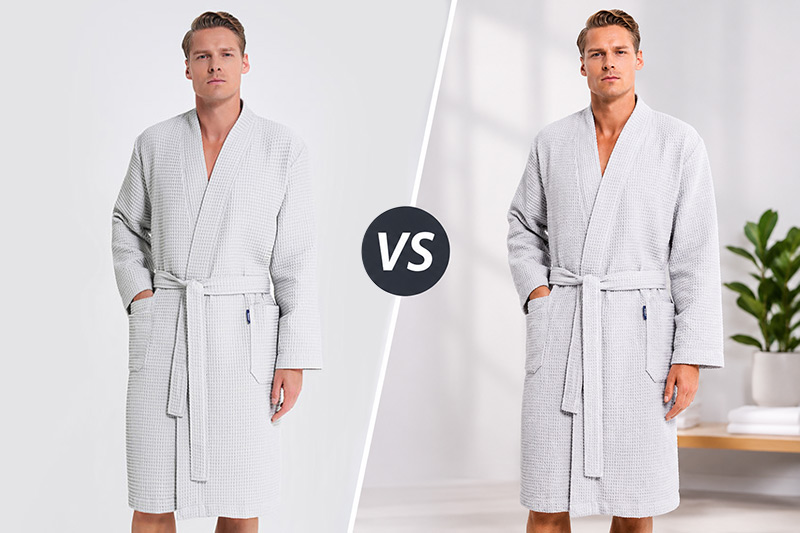
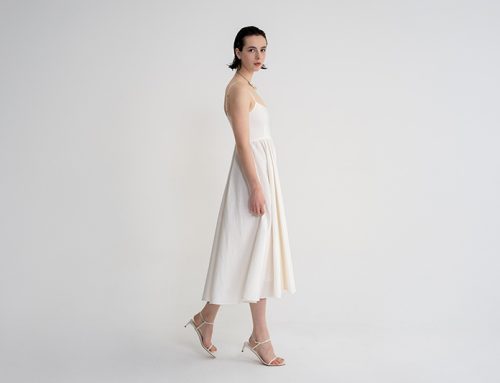
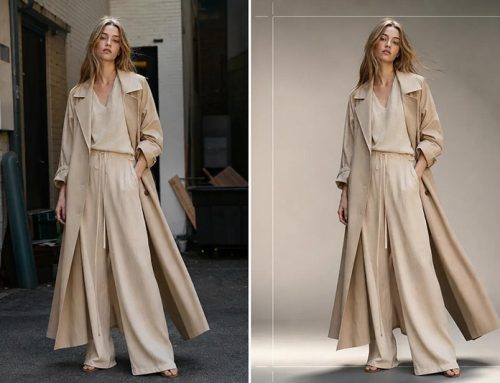
AI Product Photography background Comparison
1. What Is AI Product Photography?
AI product photography refers to the use of artificial intelligence to create, enhance or modify product images.
Traditional product photography generally requires a physical product, camera, lighting setup, background and photography equipment. AI-assisted workflows can use an existing product photograph as a starting point and generate additional visual content through image editing or generative AI.
For example, a brand can photograph a handbag against a simple studio background and use AI to place it in a lifestyle setting. The original product remains the visual reference, while the surrounding environment can be changed.
AI product photography can involve several different processes:
- Generating new backgrounds for existing product images
- Creating lifestyle scenes from isolated product photographs
- Replacing or extending image backgrounds
- Adjusting lighting and atmosphere
- Generating creative advertising concepts
- Creating product images in different environments
- Producing visual variations for marketing campaigns
- Improving or editing existing product photographs
The important distinction is that AI can assist with the visual production process, but it does not automatically guarantee an accurate representation of the actual product.
For a broader introduction to professional product photography, see my Product Photography Guide for E-commerce Brands, which covers traditional product photography methods, image types and production considerations.
2. How Does AI Product Photography Work?
AI product photography tools use image recognition, machine learning and generative models to analyse and modify visual content.
The exact process depends on the software, but most workflows begin with an existing product image or a reference photograph.
Step 1: Prepare the Original Product Photograph
Start with a clear photograph of the actual product.
The image should show the product accurately, with sufficient resolution and visible details. A clean background can make subject recognition and background replacement easier.
For the best results:
- Use sharp, high-resolution photographs.
- Ensure the product is properly lit.
- Avoid excessive shadows or reflections.
- Keep the product fully visible.
- Make sure important details are not hidden.
- Use accurate product colours.
AI can generate a new environment, but it cannot reliably reconstruct every detail of a product that was never captured clearly.
Step 2: Remove or Separate the Background
Many AI tools can identify the main subject and separate it from the original background.
This creates an isolated product image that can be placed into a new environment.
Depending on the software, background removal can be automatic or require manual corrections around complex edges.
This step is especially important for products with transparent materials, reflective surfaces, fine details or irregular shapes.
You can also read my dedicated guide to AI Background Replacement for Clothing Product Photography to learn how AI background replacement can be used in fashion and clothing images.
Step 3: Choose the Visual Concept
Before generating a new image, decide how the product should be presented.
For example:
- A skincare product on a clean bathroom surface
- A handbag in a modern luxury interior
- A pair of sneakers in an urban environment
- A coffee product on a kitchen counter
- A fashion accessory in a minimal studio setting
The concept should support the product and the brand’s identity rather than simply create an attractive background.
Step 4: Generate the New Scene
Enter a detailed prompt describing the environment, lighting, composition and visual style.
Some tools generate a complete scene around the product, while others allow more controlled background editing.
The product reference should remain the main visual guide.
Step 5: Review and Refine the Result
AI-generated images should never be accepted without checking them.
Look closely at:
- Product shape and proportions
- Brand logos and labels
- Colour accuracy
- Fabric and material texture
- Shadows and reflections
- Contact between the product and the surface
- Unwanted or generated objects
If the AI changes the product itself, the image may no longer be suitable for commercial product presentation.
Step 6: Final Editing and Export
The final image may need additional work in Photoshop or another editing application.
Adjust colour, contrast, shadows and sharpness. Check the image dimensions and file format required by the website or marketplace.
The result should look professional while remaining faithful to the real product.
3. Benefits of AI Product Photography for E-commerce Brands
AI product photography offers several advantages, particularly for businesses that need a large amount of visual content.
Faster Content Production
Traditional photography requires planning, shooting and post-production. AI can make certain editing tasks and visual variations much faster.
For example, once a product has been photographed, a brand may generate several background concepts without arranging a separate photoshoot for each one.
This can be useful when preparing seasonal campaigns or refreshing online store visuals.
More Creative Background Options
A single product photograph can be adapted to different visual environments.
A cosmetics brand might create a clean studio image, a natural bathroom scene and a premium advertising concept using the same original product photograph.
This gives marketing teams more flexibility when developing visual content.
Lower Costs for Certain Visual Requirements
AI can reduce the need for repeated photography sessions when the only change is the background or visual environment.
However, this does not mean that all product photography costs disappear.
Brands still need accurate original photographs, software, editing time and quality control. Complex scenes may also require professional retouching.
The financial advantage depends on the type and volume of images being produced.
More Marketing Variations
E-commerce brands often need different visual formats for product pages, social media, advertising and email campaigns.
AI can help create alternative compositions and background styles for testing.
Instead of using one image everywhere, a brand can develop several visual versions for different marketing channels.
Easier Visual Localisation
Brands selling in different markets may want to adapt their marketing images to different environments or seasonal campaigns.
AI-generated scenes can help create variations without photographing the same product in multiple locations.
The product itself should remain accurate and unchanged.
Scalable Content Workflows
For brands with large catalogues, AI-assisted editing can support a repeatable workflow.
A consistent set of visual guidelines, reference photographs and prompts can help teams produce images with a more uniform appearance.
Human review is still necessary, especially when the images are used to represent actual products for sale.
4. Best AI Tools for Product Photography
Different AI tools serve different purposes. Some focus on background generation, while others are designed for image editing, lifestyle scenes or creative concept development.
The right choice depends on your workflow, the type of product and the level of control you need.
Adobe Photoshop and Adobe Firefly
Adobe Photoshop combines traditional image editing with AI-powered features.
Generative Fill and other AI tools can help extend images, remove unwanted elements, modify backgrounds and create additional visual details.
Adobe Firefly also provides generative image capabilities that can support creative product concepts and background generation.
These tools are useful for photographers and retouchers who want to combine manual editing with AI-assisted workflows.
Official resources:
Shopify AI Media Generation
Shopify offers AI-powered media generation within its file editor for eligible stores.
Its features include changing an image background to a solid colour and generating image variations through natural-language prompts.
This can be convenient for merchants who already manage their product images inside Shopify.
The available features depend on the store’s plan and Shopify’s current product offering.
Official resource: Shopify Media Generation
Photoroom
Photoroom provides tools for background removal, product image editing and background generation.
It is designed for businesses that need to prepare product visuals efficiently, particularly for e-commerce and marketplace listings.
Official website: Photoroom
Pebblely
Pebblely focuses on creating product backgrounds and lifestyle-style scenes from existing product images.
It can be useful for brands that want to produce advertising and social media visuals without building every scene physically.
Official website: Pebblely
Folio AI
Folio AI is another option for creating AI-assisted product imagery.
It can be explored as part of a workflow for generating product visuals and creative scenes.
I have also prepared a separate step-by-step article about using Folio AI. This current guide focuses on AI product photography as a broader subject, while the Folio AI article covers the use of one specific tool.
5. AI Product Photography for Different Product Categories
AI product photography can be useful across many industries, but each product category presents different challenges.
Fashion and Clothing
Fashion brands can use AI to create alternative backgrounds, lifestyle settings and campaign concepts from existing clothing photographs.
For example, a product photograph of a jacket can be adapted to an urban setting or a minimal studio environment.
However, clothing requires particular attention to accuracy.
AI may change garment proportions, fabric texture, stitching, buttons, zippers or other design details. These changes can misrepresent the product.
For this reason, AI-generated environments should be reviewed carefully, especially when the image is intended for an e-commerce product page.

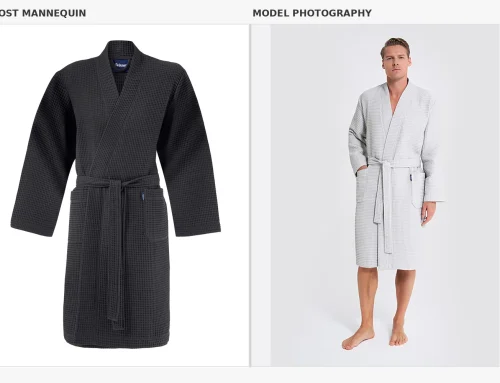
Twinzen E-commerce Photography. AI Product Photography
AI was used to shorten the male model’s chest area while preserving the garment’s overall appearance and natural proportions.
Cosmetics and Beauty Products
Cosmetics products are often suitable for AI-assisted visual concepts.
A skincare bottle can be placed in a bathroom environment, surrounded by natural ingredients or presented in a clean studio setting.
AI can help create different advertising concepts, but labels, packaging, colours and product names must remain accurate.
Furniture and Home Decor
Furniture brands can use AI to visualise products in different interior environments.
A chair, table or decorative object can be shown in a modern living room, minimalist interior or warm residential setting.
The main challenge is preserving the exact dimensions, proportions, materials and construction of the product.
Jewellery and Accessories
Jewellery and accessories often require precise details.
AI can help create creative backgrounds and advertising concepts, but reflections, stones, metal surfaces, small details and product proportions must be checked carefully.
For high-value products, accurate original photography remains particularly important.
Food and Beverage
AI can help generate creative environments and marketing concepts for packaged food and beverage products.
However, the actual packaging, ingredients, serving size and appearance should not be misrepresented.
A generated lifestyle scene should support the real product rather than create expectations that the product cannot meet.
6. AI Product Photography vs Traditional Product Photography
AI and traditional photography are not necessarily competing methods. They can work together as part of a single production workflow.
Traditional photography captures the real product. AI can then help adapt the image for different creative and marketing purposes.
| Comparison | AI Product Photography | Traditional Product Photography |
|---|---|---|
| Main process | AI generation and image editing | Physical photography and retouching |
| Background options | Can generate many environments | Requires physical sets or editing |
| Product accuracy | Requires careful review | Captures the actual product directly |
| Creative variations | Fast to generate in many cases | May require additional setups |
| Lighting control | Prompt-based or AI-assisted | Direct control during the shoot |
| Material details | May alter or invent details | Captures real textures and surfaces |
| Brand consistency | Requires prompt and output control | Can be standardised through a production setup |
| Best use | Creative variations and selected editing tasks | Accurate product representation and controlled visuals |
When Is Traditional Photography Better?
Traditional photography is particularly important when:
- Exact product colours must be represented.
- Fabric texture and construction are important.
- The product has reflective or transparent surfaces.
- Customers need accurate views of product details.
- The images are used for technical product information.
- The brand requires consistent, repeatable catalogue images.
When Is AI Photography More Useful?
AI can be particularly useful when:
- You already have good original product photographs.
- You need alternative background environments.
- You want to test several creative concepts.
- You need additional marketing variations.
- You want to adapt images for different campaigns.
- You need to create lifestyle-style visuals without building every physical set.
The most practical solution for many businesses is a hybrid workflow that combines real product photography with AI-assisted image production.
7. How to Create Better AI Product Photography: Practical Tips
The quality of an AI-generated product image depends heavily on the original photograph, the instructions and the final review.
Here are some practical recommendations.
Start with a High-Quality Original Image
AI works more reliably when it has a clear product reference.
Use professional lighting, accurate colours and a clean composition. Avoid starting with a small, blurry or heavily compressed photograph.
Use Detailed Prompts
General prompts often produce generic results.
Instead of writing:
“Place this product in a beautiful environment.”
Describe the scene more precisely:
- Product type
- Background material
- Lighting direction
- Camera angle
- Composition
- Colour palette
- Mood
- Visual style
A more specific prompt gives the AI clearer creative direction.
Keep the Product as the Main Reference
If the purpose is to sell a real product, the original product should remain the source of truth.
Avoid instructions that allow the AI to redesign the product unless you are creating a conceptual image rather than an accurate product listing.
Develop a Consistent Brand Style
Create a simple visual guide for your AI-assisted images.
Define:
- Background colours
- Lighting style
- Camera perspective
- Composition
- Shadow treatment
- Brand atmosphere
- Image dimensions
Save successful prompts and settings so that future images can follow the same visual direction.
Review Every Generated Image
AI tools can introduce details that were not present in the original product.
Check logos, labels, seams, textures, proportions, shadows and reflections before publishing.
Use AI for the Right Purpose
Not every product image needs to be AI-generated.
A clean catalogue photograph may be more effective than an elaborate generated scene. Use AI when it adds genuine value to the presentation.
8. Common Problems and Limitations of AI Product Photography
AI product photography can save time and create new possibilities, but it also introduces risks.
Incorrect Product Details
AI may change product proportions, logos, labels, buttons, stitching or packaging.
This is one of the most important issues for e-commerce brands because customers expect the delivered product to match the photograph.
Unrealistic Shadows and Lighting
Generated scenes may contain shadows that do not match the product’s position or lighting direction.
The result can look artificial even when the background itself is convincing.
Inconsistent Visual Results
Generating many images with different prompts can create an inconsistent visual style.
This is particularly problematic for brands that need a uniform product catalogue.
Generic AI Aesthetics
Many AI tools can produce similar-looking environments and lighting styles.
Without a clear creative direction, different brands may end up using almost identical visual concepts.
Copyright and Usage Considerations
Brands should check the terms of the AI tools they use, including commercial usage rights, content ownership provisions and restrictions.
They should also use product photographs, reference images and visual assets they have the right to use.
Quality Control Takes Time
AI generation is not always a one-click process.
Images may need several attempts, manual corrections and professional retouching before they are ready for publication.
The time saved during production should be balanced against the time required for reviewing and correcting the results.
9. AI Product Photography and E-commerce Image Requirements
A visually attractive image is not automatically suitable for every e-commerce platform.
Product images must follow the technical and content requirements of the website or marketplace where they will appear.
For example, Google Merchant Center requires product images to accurately display the product. It also restricts promotional overlays and certain image treatments in main product images.
Google additionally requires images created using generative AI to retain metadata identifying them as AI-generated, including the IPTC DigitalSourceType value TrainedAlgorithmicMedia.
This is important when preparing AI-generated images for product feeds. Do not remove embedded AI metadata during editing or export.
Before uploading images, review the latest requirements:
Requirements can change, so brands should check the current platform rules before publishing or submitting product images.
10. A Professional Hybrid Workflow: Photography and AI Together
For many fashion and e-commerce brands, the strongest approach is not to replace photography with AI, but to combine the two.
A professional hybrid workflow begins with accurate photographs of the real products. AI is then used to create additional visual variations where it is appropriate.
A typical workflow can look like this:
Step 1: Photograph the Real Product
Capture the product using professional lighting and accurate colour representation.
Step 2: Select and Retouch the Original Images
Choose the strongest photographs and complete essential corrections.
Step 3: Prepare AI-Ready Images
Separate the product from its background when necessary and prepare clean reference images.
Step 4: Generate Additional Visuals
Use AI to create selected backgrounds, lifestyle scenes or campaign concepts.
Step 5: Compare the Results with the Real Product
Check the product’s shape, colour, texture, branding and details.
Step 6: Complete Professional Retouching
Correct any remaining issues and make sure the final image looks natural.
Step 7: Export for Different Channels
Prepare the final images according to the requirements of the online store, marketplace, website or advertising platform.
This approach allows brands to benefit from AI while maintaining control over the accuracy of their product images.
For brands that need both photography and a coordinated production workflow, I also offer professional photography and production services.
11. Is AI Product Photography Replacing Professional Photographers?
AI is changing the way product photography is produced, but it does not eliminate the need for professional photography skills.
A successful product image still depends on understanding light, composition, colour, materials, camera perspective and visual communication.
AI can generate a background, but it may not understand the exact way a fabric should fold or how a reflective product should behave under studio lighting.
Professional photographers also bring creative direction and product knowledge to the process. They can identify which details matter, how the product should be presented and which images are appropriate for different commercial uses.
The future of product photography is likely to involve a combination of traditional photography, AI tools and professional post-production.
For brands, the important question is not whether to use AI, but where it can improve the production process without reducing image quality or customer trust.
Frequently Asked Questions About AI Product Photography
What is AI product photography?
AI product photography uses artificial intelligence to create, enhance or modify product images. It can generate backgrounds, create lifestyle scenes, adjust lighting and produce visual variations from existing product photographs.
Can AI create product photos without a photoshoot?
AI tools can generate product-style images from prompts or reference images. However, for accurate commercial product presentation, using a real photograph of the actual product as a reference is generally the safer approach.
Is AI product photography good for e-commerce?
Yes. AI can help e-commerce brands create additional visual content, generate background variations and adapt images for marketing campaigns. The final images must still represent the actual product accurately.
What is the best AI tool for product photography?
The best tool depends on the task. Photoshop and Adobe Firefly are useful for editing and creative control, Photoroom and Pebblely offer product-focused image workflows, and Shopify provides AI media generation for eligible stores.
Can AI replace traditional product photography?
AI can support and extend traditional photography, but it is not a complete replacement for every product category. Accurate colour, texture, shape and product details often require professional photography and human quality control.
Can AI product photography reduce costs?
It can reduce the need for repeated background setups and additional lifestyle shoots in some projects. However, original photography, software, editing and quality control still have costs.
Can AI change the actual product in a photograph?
Yes. Generative AI may unintentionally alter logos, labels, proportions, materials or other details. This is why every generated image should be checked against the real product before publication.
Is AI-generated product photography allowed on Google Shopping?
Google requires AI-generated images submitted through Merchant Center to retain metadata identifying them as AI-generated. Product images must also accurately represent the item and follow Google’s image requirements. Always check the current Merchant Center policy before uploading.
Should fashion brands use AI for clothing product photography?
Fashion brands can use AI for selected background changes, lifestyle concepts and campaign variations. However, garment fit, fabric texture, colour and construction should be accurately represented. A hybrid workflow combining professional photography and AI editing is often a practical solution.
Conclusion: The Future of AI Product Photography
AI product photography gives e-commerce brands new ways to create visual content, experiment with backgrounds and produce marketing variations.
It can make certain production tasks faster and more flexible, but the quality of the original photograph and the accuracy of the final image remain essential.
For clothing brands, manufacturers and online retailers, the most effective approach is to combine professional product photography with AI-assisted editing where it adds value.
The goal should not simply be to create more images. It should be to create accurate, consistent and commercially effective visual content.
If your brand needs professional product photography, fashion images or a combined photography and AI-assisted production workflow, contact me to discuss your project.
Umur Dilek
Fashion Photographer | Product & Commercial Photography


Leave A Comment